
Run your travel-baseball program
like a front office.
Lineups, rosters, schedules, budgets, dues — plus a homepage for every family. One dugout for the whole team, so you spend less time in spreadsheets and more time between the lines.
Free to start — no credit card required.
No ads. No surprise auto-renewals.Switching from TeamSnap?

 Coming soon
- $0
- free to get started
- 6-inning
- lineups in minutes
- 0
- spreadsheets required
| Batter | 1 | 2 | 3 | 4 | 5 | 6 |
|---|---|---|---|---|---|---|
| #12 J. Ramos | P | P | SS | SS | — | — |
| #7 A. Cole | C | C | C | 1B | 1B | — |
| #4 M. Diaz | SS | SS | P | P | 3B | 3B |
| #21 T. Boone | CF | CF | — | CF | CF | CF |
| #9 R. Kim | LF | — | LF | LF | RF | RF |
Set up in an afternoon
No migration project, no training. Three steps and you're running the season.
- 1
Create your team
Sign up and set up your team and season in a couple of minutes. No credit card.
- 2
Add your roster
Type players in or import a CSV, then pull your whole schedule straight from GameChanger or any iCal link.
- 3
Set dues and go
Build a fee plan, invite families to their own homepage, and start collecting — by card or by hand.
Everything the front office needs
From the first lineup card to the last dues reminder — DugoutHQ covers the whole season.
Lineups in minutes, not spreadsheets
Drag your batting order, drop a position in every inning, and watch infield / outfield / bench balance update instantly. Save any lineup as a template, reload it next game day, and print a clean dugout sheet.
A homepage for every family
Give parents their own login to a read-only team page — schedule, their own dues balance, links, roster and coach contacts, all in one place.
Team chat, without the group text
Message the whole team, a smaller group, or one family — react to messages, share photos, and mute or block when you need to. Post an announcement and it lands as a banner on every family's homepage.
Roster & depth chart
Every player, jersey and parent contact together, plus a depth chart your lineups can seed from — drag-to-rank on a laptop, a clean tap-to-reorder list on your phone.
Schedule that syncs itself
Games, practices and events in a list or month calendar — or pull your whole slate straight from GameChanger. Set a practice to repeat weekly, subscribe your phone calendar so it stays current on its own, and tap any field for directions.
Find teams near you
Put your team on the map and browse programs in your area — filter by distance, age group and season, see who's actively fielding a roster, and message another team's coach to line up a scrimmage.
Action items families actually finish
Every family gets a short personal to-do list on their homepage and phone — built automatically from what's actually outstanding, plus anything you push yourself: a form, a fee, gear for Saturday. Items clear as things get done.
Practice plans on the event
Sketch the practice right on the schedule — what you're running and when — so assistant coaches show up knowing the plan and parents stop asking what to bring.
Collect dues your way
Families pay by card through your own Stripe — and every payment posts itself against the right installment, so your books stay current with zero data entry. Or log Venmo, checks and cash by hand, and split any fee into installments on your timeline.
Fundraise as a team
Launch a campaign with a goal and a deadline, share one public page and a printable QR flyer, and collect donations by card. The money goes to your team's own account and posts itself against a running total.
Reminders on autopilot
Families get nudged on the cadence you set — a few notices before a due date, then again while it's overdue. Or send one by hand.
Budgets & expenses
Plan tournament fees, umpires and gear, then watch estimated vs. actual update as you log expenses and attach receipts.
Links & documents
Keep uniform stores, tournament pages and rules a tap away, and store waivers, insurance and receipts securely.
The real thing, not a mockup
Here's what you actually get — straight from the app.
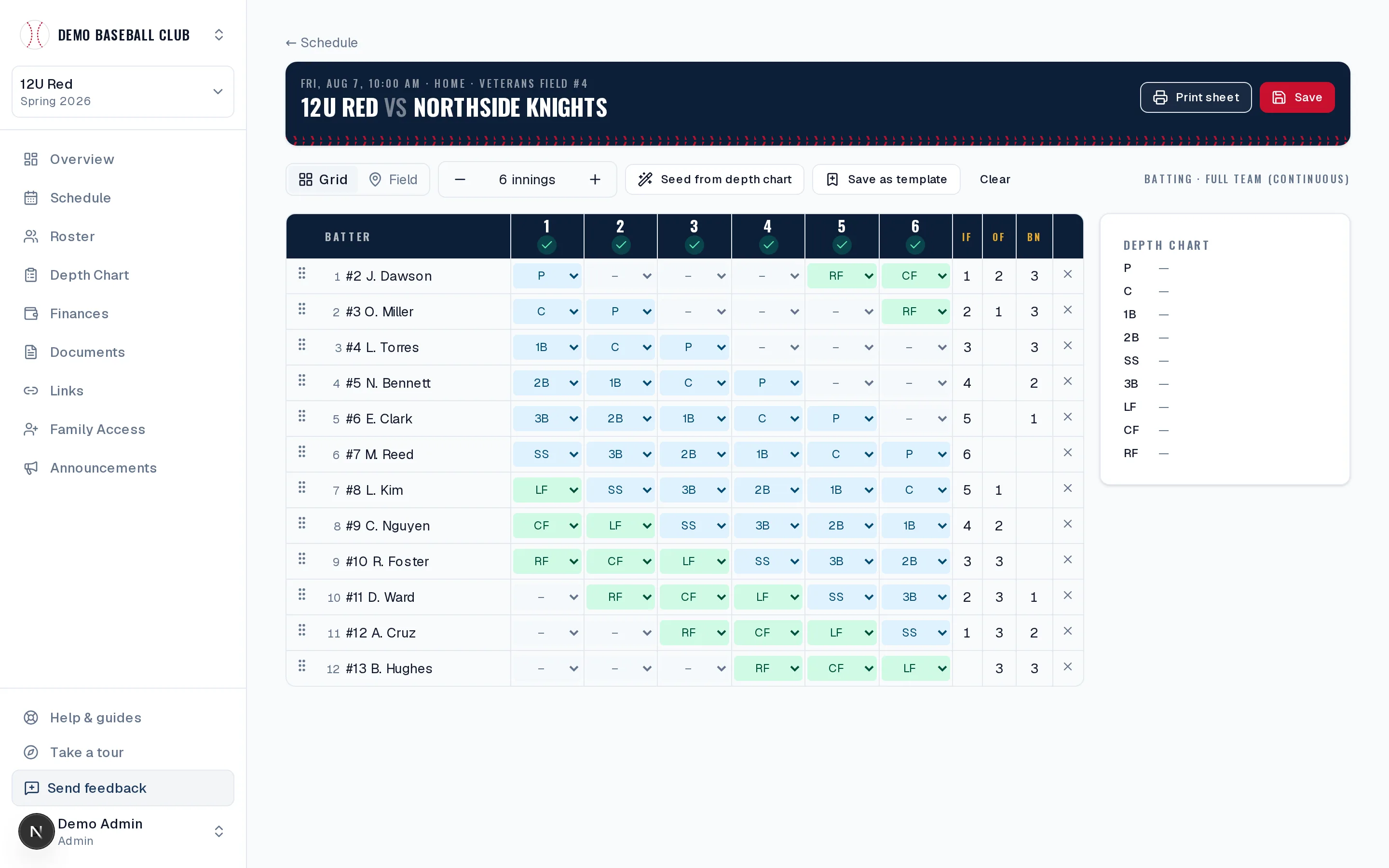
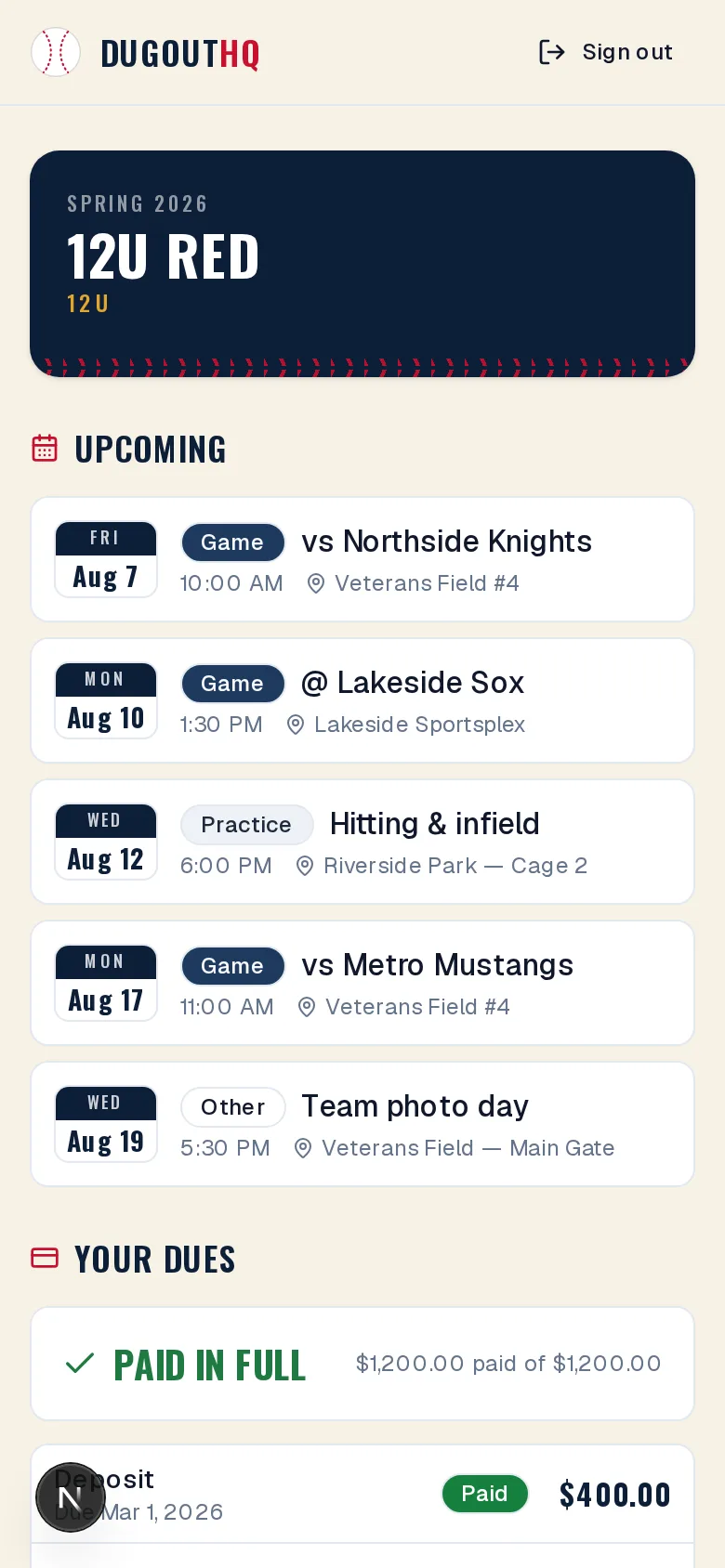
And on your phone in the third-base coach's box.
Drag your batting order, set fielding by inning, and print a clean dugout sheet — playing-time balance tracked for you.
Try the free lineup card maker →One dugout, three points of view
Coaches
Lineups, roster, depth chart and schedule — game-day tools that take minutes, not spreadsheets. Print a dugout sheet and go.
Treasurers
Dues, budgets, expenses, receipts and reminders on autopilot. Card payments post themselves, so the books stay current with zero data entry.
Parents
One private homepage — the schedule, their own balance, team links and coach contacts. Pay dues by card in seconds.
Every parent, on the same page
Stop re-answering “when's the next game?” and “what do we owe?” in the group chat. Invite families and each one gets a private login to a clean team page — the schedule, their own balance, team links, roster and coach contacts. Read-only, always current, nothing for you to maintain.
- Their own dues balance and what's due next
- Upcoming games & practices
- A personal action-item list that clears itself
- Their player's walk-up song — picked by them
- Uniform, swag and tournament links
Works alongside GameChanger
Already on GameChanger? Keep it — DugoutHQ isn't a scoring app. Paste your GameChanger (or any iCal) schedule link and your games and practices flow in and stay current, while DugoutHQ runs the roster, dues, budgets and lineups. Keep scoring where you score; run everything else here.
The dugout, in your pocket
The DugoutHQ iPhone app puts the schedule, team chat, lineups and dues in every coach's and parent's pocket — with push notifications for the things that can't wait. Android is on deck: it's submitted to Google Play now.
Coming soonNo ads. No subscription. No surprise billing.
Your families will never sit through an ad just to check the schedule, and there's no annual subscription lurking to auto-renew. DugoutHQ earns one honest way — a small, up-front fee only when a card payment moves, and nothing when you log Venmo, checks or cash. No banner ads, no “remove ads” upsell, no per-device charge. See how we compare to TeamSnap.
Built by a travel-ball parent who was tired of the group chat
Before you sign up
- What does DugoutHQ cost?
- Setting up and running your team — rosters, schedules, lineups, dues tracking, budgets, and the family homepage — is free. Card payments carry a processing fee (the card processor's fee plus a small DugoutHQ service fee), while logging Venmo, checks, or cash by hand is free. The fundraising fee is broken down in full on the fundraising page.
- Do we have to give up GameChanger?
- No. DugoutHQ isn't a scoring app and doesn't replace GameChanger — it runs the money and the roster alongside it. Paste your GameChanger (or any iCal) schedule link and your games and practices flow in and stay current. Keep scoring where you score.
- Can parents see other families' dues balances?
- No. Each family gets a private login that shows only their own balance and what's due next. No family can ever see another family's money.
- How do card payments work?
- You connect your team's own Stripe account, so the money goes straight to your team's bank — DugoutHQ never holds it. Card payments carry a processing fee (the card processor's fee plus a small DugoutHQ service fee), and each one posts itself against the right installment automatically.
- Can different coaches and treasurers have different access?
- Yes. Assign roles — head coach, treasurer, assistant coach, and more — so the treasurer runs the money, coaches run the roster and lineups, and each person sees only what they should.
- What happens to our data if we leave?
- It's your data. Export your roster, dues, and financial reports to CSV whenever you want — nothing is locked in.
- Is there a mobile app?
- Yes. The DugoutHQ iPhone app is on the App Store with the schedule, team chat, lineups and dues built in, plus push notifications. The Android app has been submitted to Google Play and is coming soon — and everything also works from any phone or laptop browser, so nobody on the team is left out.
- Is it really free to start?
- Yes — create your team and start using it with no credit card required.
Step up to the plate
Create your team in a couple of minutes. Completely free to start — no credit card, just bring your roster and go.